
-

Tutorial – Using KeePass With Two-Factor Authentication
Your Password Manager Is Insecure Unfortunately, not every website on the internet takes security all that seriously and still requires users to sign-up and authenticate with usernames and passwords. More progressive websites have started to allow users to log-in with their existing passwords but tack on a “second factor” authentication such as an SMS/text message…
-

Hardening an OpenSSH 6.2+ Server in Ubuntu 14.04
How To Secure Your OpenSSH 6.2+ Server Relearning Secure Authentication Before we even get started on securing OpenSSH you need to make sure your overall security strategy makes sense. Are you securing actual sensitive information or are you just worried about someone snooping your connection? This tutorial assumes you are protecting sensitive data and require…
-
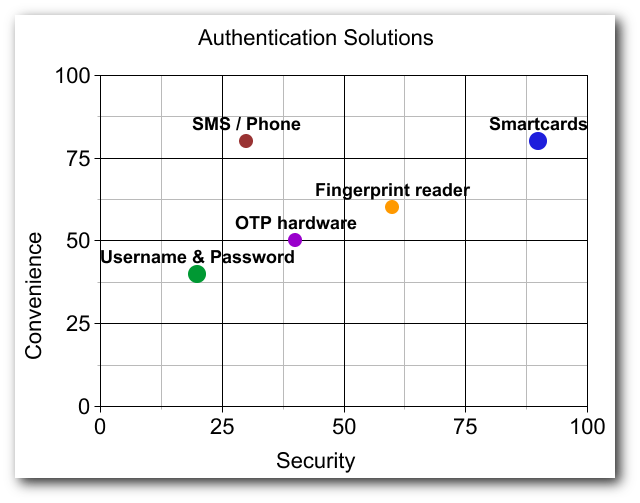
Authentication solutions comparison
There’s a lot of debate in the information security industry about what the next-gen solution will be for authenticating users into services (websites, applications, etc…). I’ve collected a list of suggested authentication solutions (both hardware and software mechanisms) and will try to shed some light on their pros and cons.
-

What’s the Future of Passwords? A Conversation
As professionals in the authentication space, we stay up to date with technology providers and their solutions. For this post I have invited Abby Porter, Director of Product Management at Delfigo Security to discuss whether it’s time to get rid of passwords all together, and the challenges associated with doing so.
-

VideoPost: HowTo Import Certificates to WWPass PassKey
Using certificates is great, but how do you secure your keys? The WWPass PassKey is a cryptographic hardware token that bridges the gap between physical hardware and cloud technologies (Smart Card in the Cloud). Don’t store your private keys on your insecure PC where they can be easily stolen or destroyed, use the PassKey where…
-

OpenVPN, WWPass PassKey Two-Factor Authentication Integration
OpenVPN relies on cryptographic keys and certificates for secure communication between a VPN client and the remote server. The WWPass PassKey technology, in conjunction with Microsoft CryptoAPI, can fortify those keys and give users and systems administrators peace of mind by taking the challenge of protecting private cryptographic information out of their hands.
-

Introducing The WWPass Developers Blog
Joscor Technical Research and WWPass Developers Blog have partnered to provide you with the latest news and integration paths for WWPass and related security technologies. We will work more closely now to discover new ways to increase end-user data security within their day-to-day lives and to give tutorials on how IT administrators can increase web…
-

Smart Card in the Cloud – Emerging Technology
Smart Card as a Service, or Smart Card in the Cloud, is a revolutionary technology that forms a hybrid between physical two-factor authentication tokens and the cloud. The WWPass PassKey is an innovative product taking Smart Cards to the next level. Advantages? Anonymity, resilient and secured token storage, cloud token administration, multi-token clones, etc…!
-

Securing SCP with WWPass PassKey
Maximize security by using the WWPass PassKey to perform two-factor authentication into your publicly exposed SSH/SCP servers using WinSCP and Pageant. Never compromise when it comes to security and ditch those legacy username and password combinations.
-
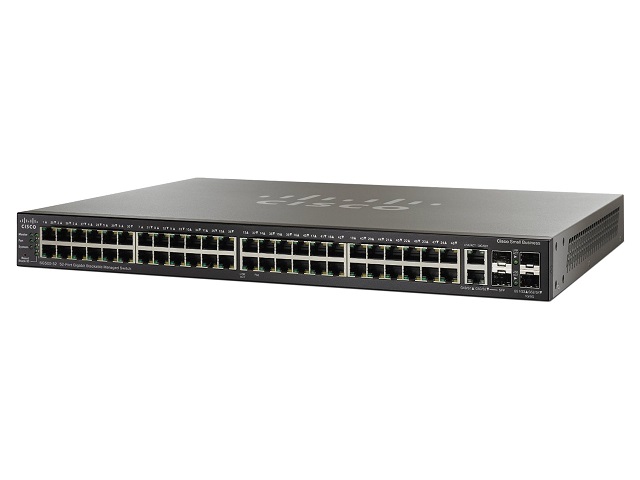
WWPass PassKey, Cisco SG500-52 Managed Switch integration
Overview Process Step 1, Generate a PKCS#12 private key and certificate file This step is relatively straight-forward and you can find explanation of this process in another article on this site: Securing OpenSSH with WWPass PassKey . If you already have an OpenSSH server running with a public key in ~/.ssh/authorized_keys you can re-use this…