Dell Inspiron 1545 Wireless Adapter Upgrade (802.11agn 5 GHz WiFi + Bluetooth 4.0)

The Problem

After recently moving to a new house, I decided to take some time to carefully plan out my home network.  One of the sore points of living in a city is that you have neighbors; lots of neighbors with WiFi APs polluting the 2.4 GHz band.  I wanted to avoid this at all costs and decided to enable the 5 GHz radio on my Netgear WNDR3700 v4 running DD-WRT build 22118 (highly capable hardware and firmware combination for a home AP). Then the pain set in… My personal laptop was not compatible with 802.11an / 5 GHz.  My personal laptop is a Dell Inspiron 1545.  This wouldn’t be such an issue normally but, after testing the two broadcasting bands, I found myself getting only 30% of the speed and reliability of the 5 GHz SSID due to a very congested 2.4 GHz range.

The Solution

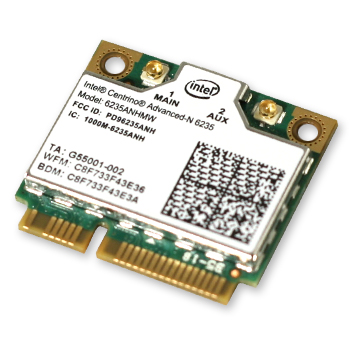
So… do I toss out my laptop?  Buy an external USB wireless adapter?  No thanks.  I’ll just replace my internal Dell Wireless 1397 WLAN Mini-Card. No cables/adapters to mess with and no major hit to my bank account.  Perfect solution.  So the real question at that point was, which internal cards will work?  First off, there is a physical size restriction.  The internal card needs to be a “half mini PCI-e card”.  Secondly, the new card needs to be compatible with 802.11an 5 GHz.  I also wanted Bluetooth compatibility (as the Dell Inspiron 1545 doesn’t come with any). After a little research, I found the Intel Centrino Advanced-N 6000-series cards.  The top of the series is the Intel Centrino Advanced-N 6300 sporting up to 450Mbps communication using triple-stream technology.  That’s really cool and all, but it does not come with Bluetooth. The next version back is the Intel Centrino Advanced-N 6235 which has support for 802.11agn, dual-stream (300Mbps), dual-band (2.4 GHz + 5 GHz) and Bluetooth 4.0.  Perfect for what I want!  After perusing eBay, I found one for roughly $20 and ordered it on the spot.

Installation

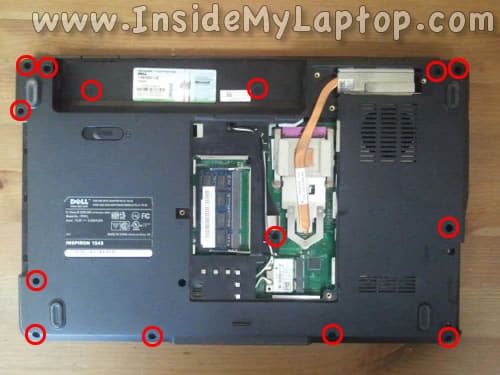
The Dell Inspiron 1545 makes it really easy to swap out cards from the internal half mini PCI-e slot.  On the bottom of the laptop is an access panel with 4 screws keeping it in place.  Removing those screws and the panel reveals certain components such as the fan and cooling assembly, RAM slots, and the mini (half) PCI-e slot. There will be two antennae cables going to your existing wireless adapter (one will be white, one black) as well as one screw holding the adapter horizontal.  Remove this screw and slide the adapter out of the slot.  Then detach the cables from the adapter. Insert the new adapter, make sure it “clicks” into the slot, then screw down the adapter.  Plug back in the antennae cables and you are good to go.  Boot up and your system will tell you it has found your new adapter and attempt to install drivers (which will fail).  I personally just plugged into my router using an Ethernet cable to download the proper drivers from Intel, but you can also use another computer and transfer the installation package via flash drive if you want.

Comments

19 responses to “Dell Inspiron 1545 Wireless Adapter Upgrade (802.11agn 5 GHz WiFi + Bluetooth 4.0)”

  1. […] wrote a more comprehensive article on this particular upgrade and that can be found here: DELL INSPIRON 1545 WIRELESS ADAPTER UPGRADE (802.11AGN 5 GHZ WIFI + BLUETOOTH 4.0).  Basically, the summary is that I found the stock Dell Wireless 1397 WLAN Mini-Card adapter to […]

  2. jhalak116 Avatar
    jhalak116

    I tried to upgrade my Dell Inspiron 1545 wireless adapter to Intel Centrino Advanced 6235, but I was not able to install the driver and ultimately was forced to remove it and reinstall my old wireless adaptor. can you please suggest what went wrong in my case? BTW, my OS is Windows Vista 64.

    1. I’d really need to know more details such as what version of driver you used and where you got it from, and also some additional information about your system. Some Dell Inspiron 1545’s may rely on different chipsets, but I haven’t found one yet. I tried this in Windows 7 x64 so there also may be some bug/incompatibilities with Vista x64 for instance.

      1. Jha Lak Avatar
        Jha Lak

        My OS is WIN 7 which wireless adaptor that I need to use on my Dell 1545.

  3. Fiverr

    […]we like to honor a lot of other world wide web web sites around the web, even if they aren’t linked to us, by linking to them. Under are some webpages really worth checking out[…]

  4. nodecks Avatar
    nodecks

    I just wanted to thank you Joscor for this article. I have a Dell Inspiron and was getting frustrated with the slow wireless speed, especially considering I’m on cable high speed Virgin. So I followed your advice and bought the Intel Centrino Advanced-N 6235, downloaded the drivers in advance of fitting the new adapter and set about the task. It was straightforward – though fiddly getting the new chip in the slot. Once in, rewired and booted, I installed the drivers. I now have 90mbs on Speedtest.net – nearly four times the previous best. Brilliant advice, great knowledge. Thank you for sharing with us. Appreciated. Trevor (Wigan – UK)

    1. Excellent feedback! Glad to hear you got everything squared away. Let me know if there’s anything else we can help with or if you have a suggestion for a future article. Thanks!

  5. Taylor Avatar
    Taylor

    I upgraded my Dell 1545 to Windows 8.1 32 bit, and Intel doesn’t provide drivers for my ancient 5-year-old Wifi card on that OS. I followed this tutorial, and I’m glad I did! The wifi card was just plug and play for me, no driver needed. Joscor, you saved me a lot of grief here.

    1. Awesome news! 🙂 Please share this article to help spread the word.

  6. arocha01 Avatar
    arocha01

    Good Day, i have a laptop Dell Inspiron 1545 and perform a upgrade the original Dell Wireless device model 1397 (Max Speed 25 Mbps) to the Intel Centrino Ultimate-N 6300, (Max Speed 450 Mbps), both half mini card, i install the last Intel PROSet/Wireless Software and Drivers
    v17.14.0_s64 and operates internet service, but now i have a problem, if the connection comes near the maximum of speed of my ISP (50 Mbps) the pc stop working and I have to restart it manually, you can help me solve this? Thanks!

  7. Kumar Avatar
    Kumar

    Hi Joscor,

    I have Inspiron 15 (N5050, Late 2011) with DW1701 (2.4Ghz) , What option i have for 5Ghz. Please advice.

    Thanks.

  8. Michael Friend Avatar
    Michael Friend

    Where can I get a diagram of the back of the laptop so I can figure out how to install the new card?
    Are there any videos you are aware of?

  9. Frank Avatar
    Frank

    where do I get the driver for Windows Vista 32 Bit?

  10. Gabriele Giuseppini Avatar
    Gabriele Giuseppini

    Hey Joshua,

    Thanks so much for your post! I’ve got the same Inspiron 1545 and was tired at how slow it was. Followed your post step by step and upgrade the card to a Centrino 6300, speed test is now super awesome!

    Just a question, which version of the Intel drivers do you have installed? I’m asking ’cause I have the latest (as of the time of this comment) but the laptop freezes every few hours or so, after which I have to reboot.

    1. Thanks for the feedback!
      As far as the drivers go, I always stick with latest (from the Intel or Dell sites, not from Windows Updates). If you’re having freezes after a few hours, it could indicate an external issue such as overheating (possibly from a faulty fan, incorrect application of thermal paste on the CPU/GPU, or blocked air intake vents). If you’re sure it’s none of those issues, you could try rolling back drivers a version or two to see if there’s any change.

      1. Gabriele Giuseppini Avatar
        Gabriele Giuseppini

        Well, it’s definitely not overheating – I’ve installed a CPU monitor and I can see the temperature going up and down with the fan turning on and off; the freezing happens far from a peak.

        I tried rolling back the drivers to 13.0.0.107, will see if that solves the problem. Cheers!

  11. Mad steve UK Avatar
    Mad steve UK

    Hi many thanks for upgrade info Lappy was running 15mb download speed now 50mb !! fantastic on 5ghz now which not available before and bluetooth got drivers from http://h20564.www2.hp.com/hpsc/swd/public/detail?sp4ts.oid=5229456&swItemId=ob_125823_1&swEnvOid=4059#

  12. Aaron Joseph Avatar
    Aaron Joseph

    Thanks for this article. I also have an Inspiron 1545 – I’ve had to replace various parts such as the plastic ring that goes around the screen, battery, etc. But I refuse to buy a new laptop because this one is perfect for my home office purposes. The wireless card on it died sometime back and I’ve been using a USB dongle on our home network to get by, but that’s annoying if I take the laptop with me anywhere. Plus my wife’s laptop is really old and thus has like a B-speed wireless adapter. After we moved, I now have the router in my office instead of hers so I gave her the high speed USB wi-fi dongle I was using since she can no longer use a hard line ethernet connection for her laptop. But that leaves me without wifi on my laptop again. I thought about buying another USB dongle for mine, but I thought “there must be a better way!” and if I was going to replace the internal card, I wanted to upgrade it to my modern 5G network. Long story short – your article had exactly what I needed. Thanks mate!

Leave a Reply

This site uses Akismet to reduce spam. Learn how your comment data is processed.

Pin It on Pinterest

Share This